The Image Height CSS option allows you to control the height of your logo images when using the Variable Width feature. This helps maintain a consistent and visually appealing carousel layout across desktop, tablet, and mobile devices.
Follow the steps below to configure the Image Height CSS option:
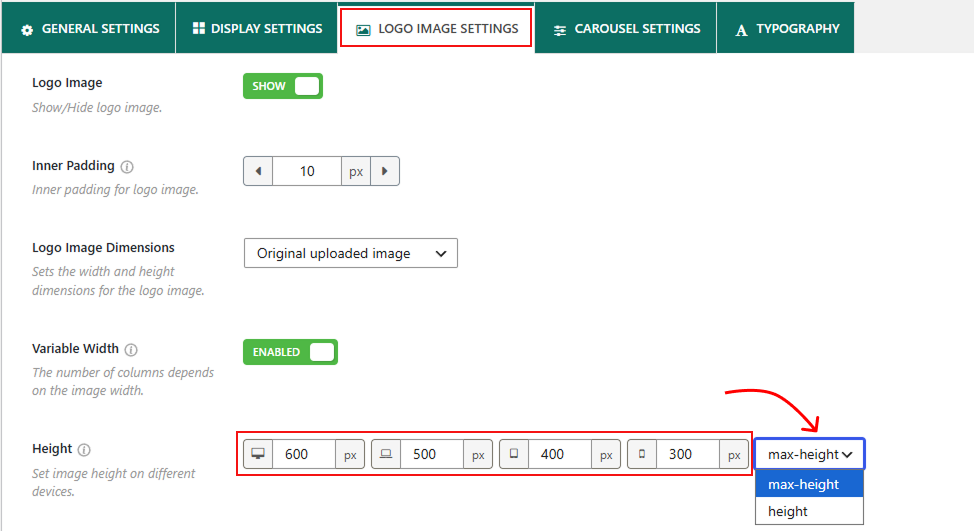
- Navigate to the Logo Image Settings tab of the plugin.
- Scroll down and find the Height option after the Variable Width.
- Enter your preferred height values for desktop, tablet, and mobile devices.
- Choose the height type that best suits your design.
The Image Height CSS option includes two settings:
Max-height: Select Max-height to define the maximum height of the logo images for each device. Images smaller than the specified value will retain their original size, while larger images will be scaled down to fit within the maximum height. This option helps preserve image proportions and creates a more flexible layout.
Height: Select Height to apply a fixed height to all logo images based on the values you specify. Regardless of an image’s size, it will be displayed at the exact height you set. This option is useful when you want all logos to appear with a uniform height throughout the carousel.
After configuring the desired values, save or update the carousel to apply the changes.