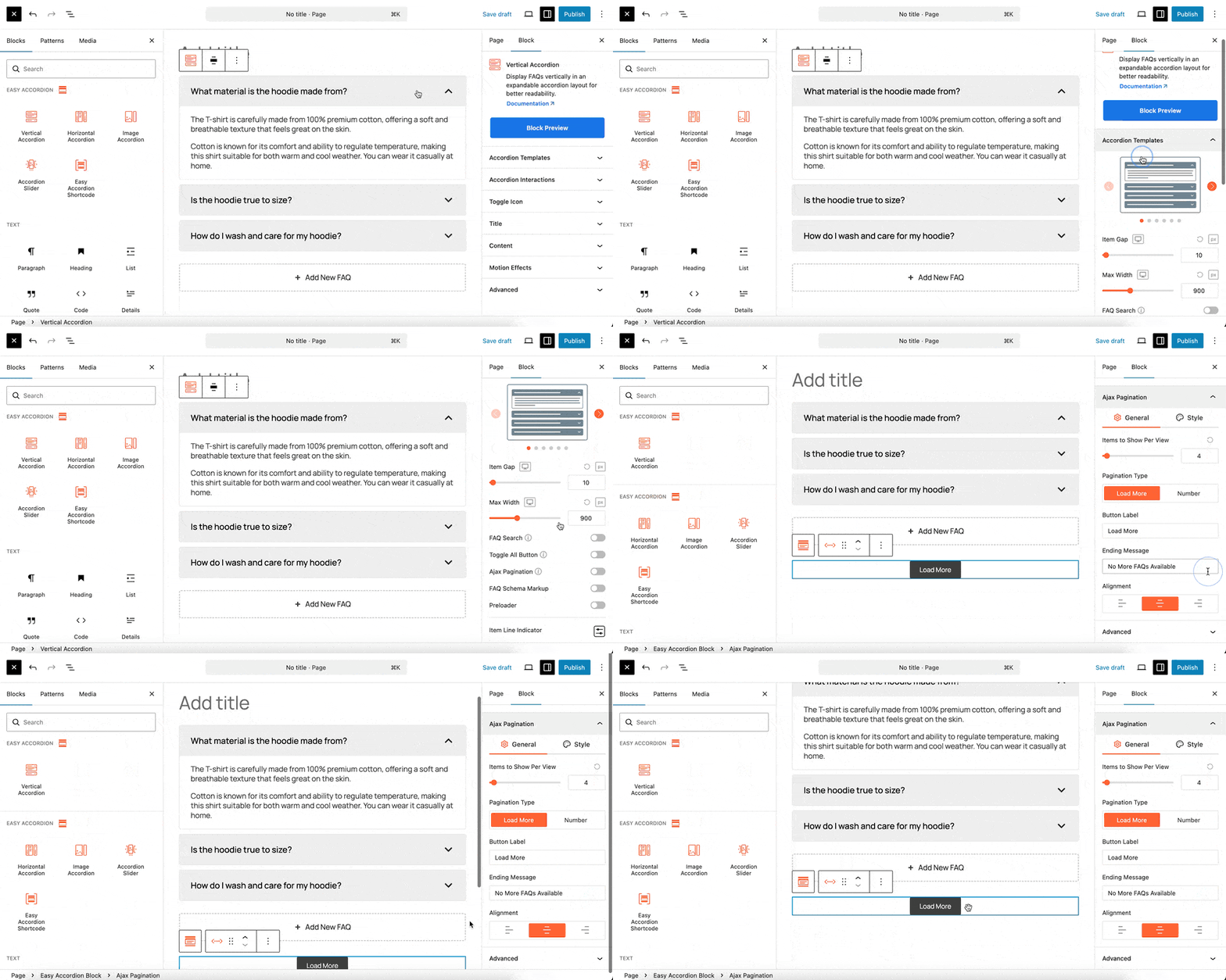
With the Ajax Pagination Block, you can add a “Load More” button to your accordion, allowing you to manage large amounts of content by loading items only when requested. This child block is an excellent tool for improving page load speed and user experience on sites with extensive accordion lists.
Step 1: Add the Ajax Pagination Child Block
- Go to your WordPress Dashboard.
- Navigate to Pages > Add New or edit a page already containing an Easy Accordion block.
- Click on the Vertical Accordion (or another compatible parent block) where you want to add pagination.
- From the right-hand settings panel under the Accordion Templates you will find the Ajax Pagination.
- Click to insert the block, positioning it above your accordion items for maximum visibility.
Step 2: Customize Your Pagination
The Ajax Pagination block streamlines how users interact with dense information by hiding secondary content behind a button. When clicked, it dynamically fetches and displays the next set of accordion items without refreshing the entire page.
Customization Tabs:
When the Ajax Pagination block is selected, the right-hand sidebar provides various settings to customize the interaction. Customize the “Load More” button text and determine how many items should be displayed per page or “load” cycle. Adjust the button’s typography, colors, padding, and alignment to match your site’s branding.
You can observe the live preview of the pagination button directly in the editor. Once you are satisfied with the configuration, click Publish or Update.